
Resumable drafts
Preserve the supported daily draft across navigation and recovery.
Resume the site and date, complete only the missing progress, labour, material, photo and issue records, then review and submit the DPR.
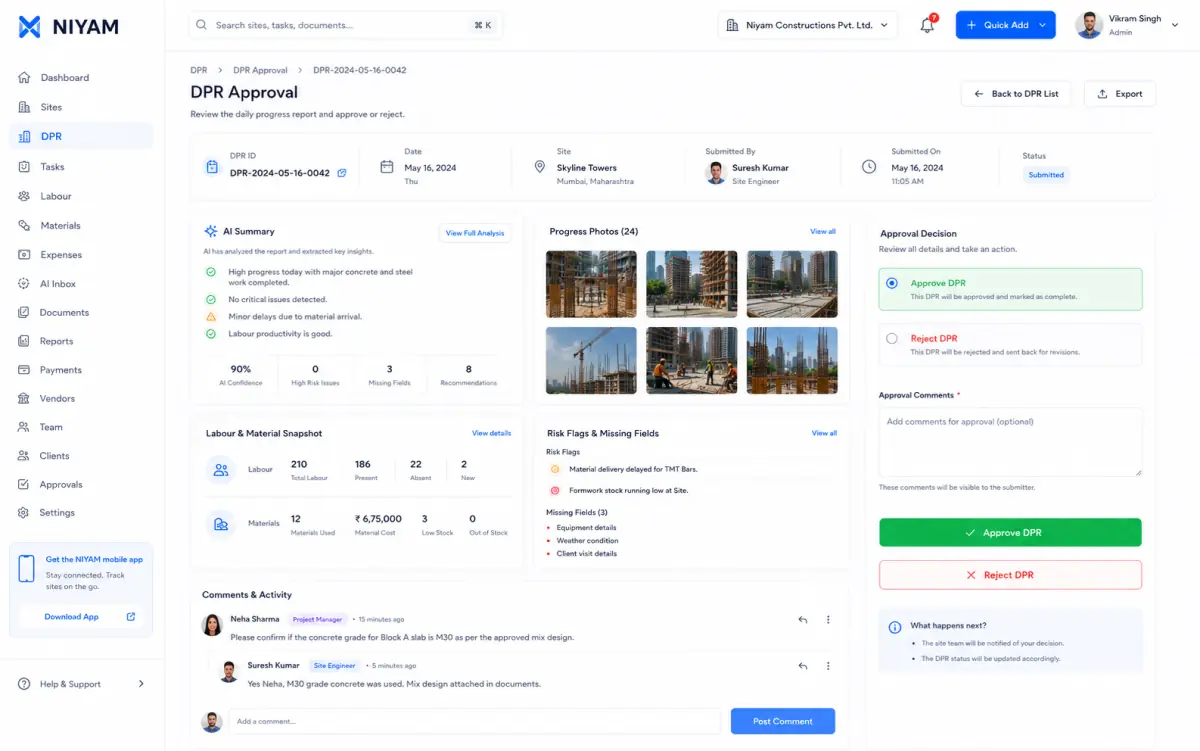
When notes, labour, materials, issues and photos arrive separately, the office must rebuild the day before it can review what happened.
Each step keeps the record, its context and the next responsibility visible.
Open the correct site and working date without losing the draft.
Capture supported progress, labour, materials, photos and issues through focused actions.
See what remains incomplete and why submission may be disabled.
Move the valid report through the supported permission-controlled decision.
Focused capabilities for the complete workflow, described within their supported operating boundaries.
Preserve the supported daily draft across navigation and recovery.
Bring supported progress, labour, materials, photos and issues into one review path.
Show incomplete information and valid disabled-submit reasons.
Keep submitted, rejected, resubmitted and approved states distinct.


The current evidence shows the daily entry point and the real Site Home context the report supports.
The feature supports the handoff without blurring who records, reviews or receives the information.
Complete the assigned frequent action with minimal typing.
Finish the supported site-day records and submit the DPR.
Review the report and its evidence before the permitted decision.
The product does not invent missing activity, submit autonomously or approve work on someone’s behalf.
Straight answers about scope, review and responsibility.
The Today workflow connects supported progress, labour, material, photo and issue records to the selected site and date.
Yes. Supported drafts are preserved and the user can return to complete the missing records.
No. Review and approval follow the current permissions and valid record state.